Writing a good quiz takes longer than most people expect. The slow part is rarely the idea. It is getting a sensible first draft of questions onto the screen. The PrettyJaded quiz builder is there to speed up that first draft, so you can spend your time on the part only you can do: deciding what your students need to know and checking that the questions test it.
Learning outcomes
By the end of this post you’ll be able to
- Explain what the quiz builder is for, and which decisions stay with you.
- Decide when a quiz is the right task and when another assessment type fits better.
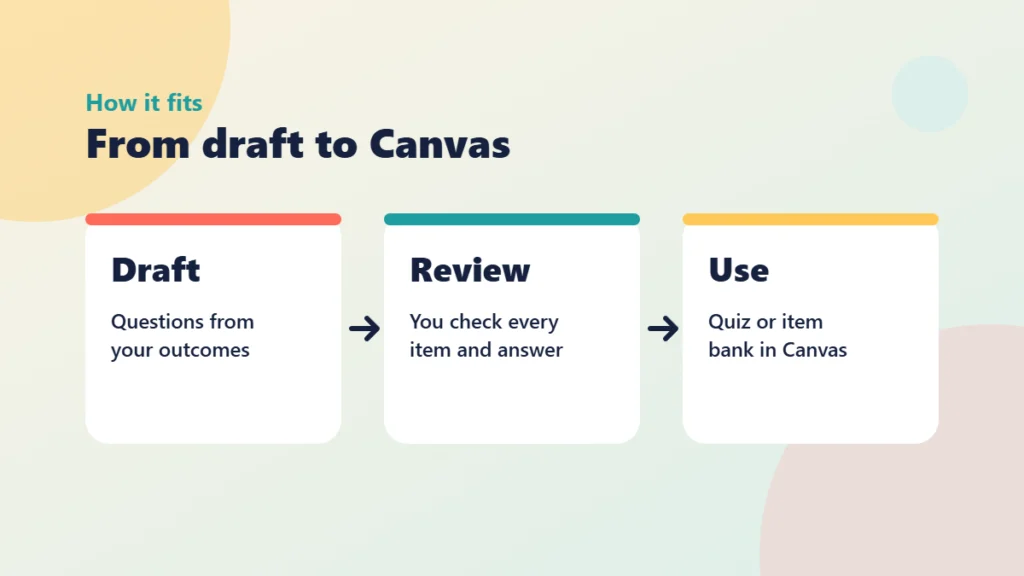
- Apply a draft, review and publish routine to move questions into a Canvas quiz or item bank.
What the quiz builder is for
The quiz builder is a tool on this site for drafting quiz questions that you can then use in Canvas. I wrote a longer introduction in Canvas Quiz Builder, so start there if you want to see the tool itself. This post is about how to use it well.
The most useful way to think about it is as a fast, slightly overeager colleague. It will give you plenty of material quickly. It does not know your students, your module or the misconceptions you see every October.
What it does well
- It gets you past the blank page, which is where most quiz writing stalls.
- It gives you several wordings of a question, so you can pick the clearest.
- It suggests plausible wrong answers you can then sharpen.
What stays with you
Every decision that matters stays with you. You choose the learning outcome the question serves. You confirm the correct answer is actually correct. You judge whether a wrong option is a realistic mistake or just a silly one. You also decide how much the quiz counts towards a grade.
That is not a limitation of the tool. It is how quiz writing should work, whoever or whatever produced the first draft. If you want to think about the wider question of what to hand over and what to keep, What to Delegate to an AI Agent in Canvas, and What to Keep covers it.
Put it into practice
Your turn
Before you open the quiz builder, write down three things a student should be able to do after next week’s session. Use verbs such as identify, explain or apply. These three statements are what you will check every drafted question against.
Where quizzes fit in good course design
A quiz is a good tool for a specific job. It is quick to complete, quick to mark and gives students immediate information about what they have understood. That makes it well suited to retrieval practice, where students pull ideas from memory instead of rereading them. It also helps you spot misconceptions early, while there is still time to do something about them.
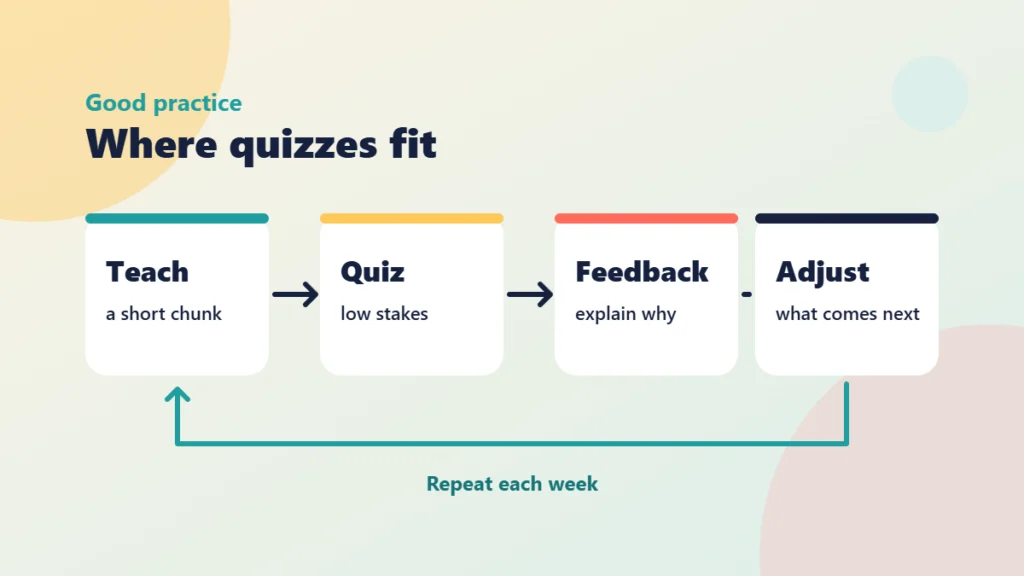
The pattern that works best is small and regular. Teach a short chunk, ask a few questions, give feedback that explains why, then adjust what you do next. A low-stakes quiz at the start of a week can also activate prior knowledge. This is the same idea that sits behind activating prior learning in PANDA.
Know what a quiz cannot show
Quizzes are good at checking recall, recognition and the application of a method to a familiar problem. They are weaker at showing how a student reasons, how they weigh up competing options or how they justify a choice. If you try to stretch a multiple-choice quiz to cover those things, you end up with trick questions and frustrated students.
The new Bloom’s taxonomy guide for new academics is a helpful check here. If your outcome says evaluate or create, a quiz may support the groundwork, but it should not carry the whole assessment. For the thinking itself, see reflection and explain-your-choices tasks in Canvas.
Be careful with high stakes
Auto-drafted questions are best used for formative and low-stakes work. If a quiz carries a significant share of a grade, the standard for checking should rise sharply, and you should think about security, access arrangements and the points raised in the dangers of using AI for summative assessments.
Quiz or another task?
Decide whether each learning goal suits a quiz or needs a different kind of task.
Using it with Canvas quizzes and item banks
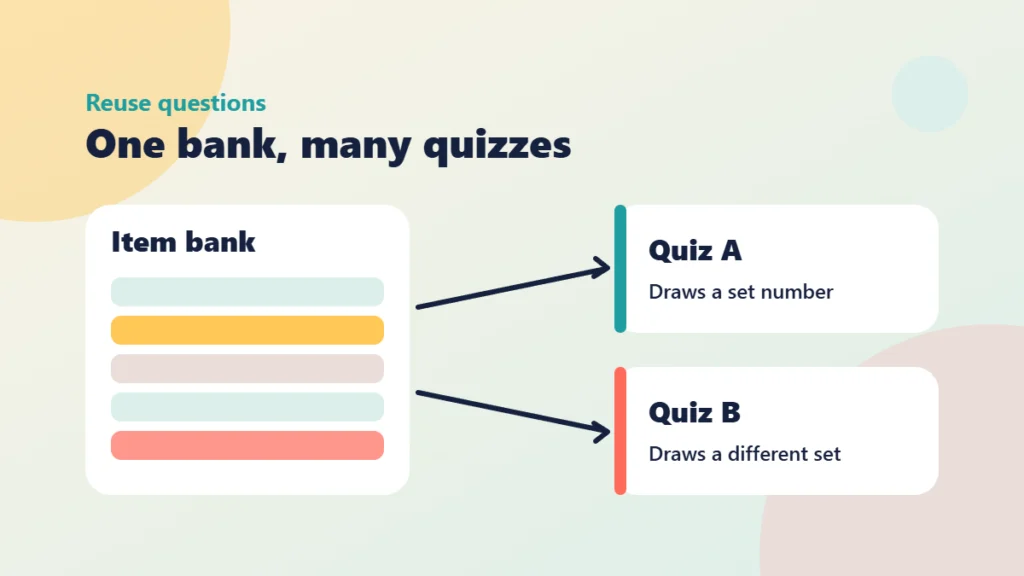
Once you have reviewed a set of questions, you have two sensible homes for them in Canvas: a single quiz, or an item bank that several quizzes can draw from. Which you choose depends on how you plan to reuse the questions.
Quiz or item bank?
Build straight into a quiz when the questions belong to one session and you will not reuse them. A short end-of-week check is a good example.
Build an item bank when you want flexibility. A bank lets you draw a set number of questions per quiz, reuse items across modules and add to the collection each year. It also makes it easier to give students a second attempt that is not identical to the first. My post on how to build Canvas item banks and why goes through the reasoning in more detail, and Instructure’s guide to managing item banks in New Quizzes shows the screens.
Put it into practice
Try it in Canvas
- In your course, open Quizzes from Course Navigation and choose to manage item banks. Create a new bank named after the topic, for example “Week 3: Sampling”.
- Add your reviewed questions to the bank, setting the correct answer and the points for each.
- Create a new quiz following Instructure’s guide to creating a quiz in New Quizzes.
- In the Build tab, add questions from your bank and choose how many to draw.
- Add feedback to each question using Instructure’s guide to question feedback.
- Preview the quiz as a student before you publish it.
Put it into practice
Your turn
Choose one topic where students repeatedly make the same error. Write down the error, then check that one of your drafted questions has a wrong option that matches it exactly. If none does, rewrite an option so it does.
Review before you publish
A short, consistent review routine catches most problems. Work through each drafted question and ask:
- Does it test the outcome you wrote down, or something easier to ask?
- Is the correct answer right, and is only one option right?
- Would a student who understood the topic still get it wrong because of the wording?
- Does each wrong option reflect a real misconception?
- Does the feedback explain why, not just give the answer?
Feedback is where a quiz teaches rather than just measures. A line explaining why option B is a common but incorrect choice is often worth more than the question itself. For more on that, see meaningful feedback and student engagement.
From draft to published quiz
Put the routine into the order that protects quality.
Check your understanding
Knowledge check
Which decisions stay with you when you use the quiz builder?
The outcome being tested, the accuracy of each answer, the quality of the wrong options and the weighting of the quiz. A draft cannot know your students or your module.
A colleague wants to use one multiple-choice quiz to assess whether students can evaluate two competing research designs. What would you suggest?
Use the quiz for the underlying knowledge and add a task where students justify their evaluation. A quiz is weak at showing reasoning.
You want three weekly quizzes to share questions, with a different selection each time. Which Canvas feature suits this?
An item bank, because quizzes can draw a set number of questions from it and you can reuse the collection.
Why should feedback on a wrong answer explain the misconception rather than just show the right answer?
Because the explanation is what helps the student correct their thinking, which is the main benefit of low-stakes quizzing.
Remember
Key takeaways
- The quiz builder speeds up the first draft. Judgement about outcomes, accuracy and distractors stays with you.
- Quizzes suit retrieval practice, early checks and misconception spotting, not reasoning or judgement.
- Use an item bank when you want to reuse questions, draw random sets or offer varied attempts.
- Review every question against a written outcome before publishing, and write feedback that explains why.
Your next step
This week, pick one module and draft five questions for next week’s topic with the quiz builder. Review them using the checklist above, add feedback to each, and place them in a new item bank in Canvas. Then build a short, low-stakes quiz that draws from it. Afterwards, look at the results in the quiz report to see which question caught the most students out.
Reflect: Which misconception in your subject would you most like a quiz to catch before it reaches an assessment?
Keep going
How to Build Canvas Item Banks and Why
What Canvas item banks are, why they save time and improve consistency, and how to build one and draw items from it in a New Quiz.
Build Repeatable Canvas Pages With the Content Builder
The Content Builder takes the formatting effort out of the Canvas RCE. Here is how to use it to build recognisable page structures you can repeat across a whole course.
Three Canvas Changes to Check Before Marking This Autumn
Three small changes in the latest Canvas notes touch your autumn routine: excusing group submissions, a crossed-out eye icon and a backup reminder. Here is what to check.